![image_white (1).png]](https://faq.beetogreen.com/hs-fs/hubfs/image_white%20(1).png?height=40&name=image_white%20(1).png)
1. Worklife Card
The Worklife card is a payment method funded by companies to support their employees’ use of sustainable mobility.
Employees can use their card to pay directly for a purchase or a rental.
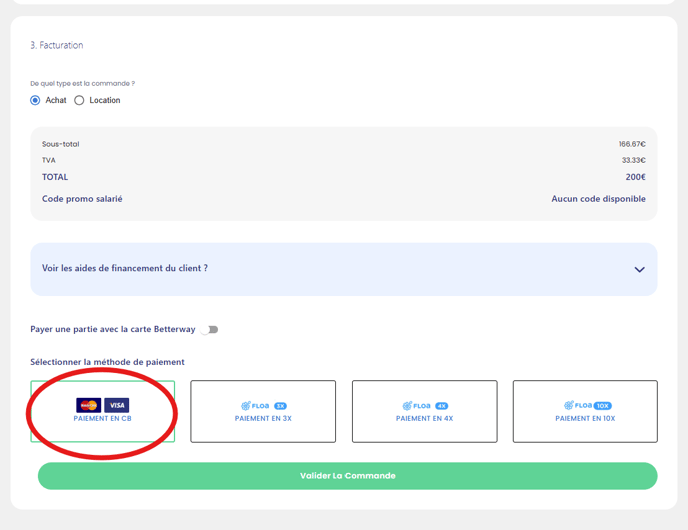
For employees with a Worklife card, the payment process is simple. Since the card is linked to their personal account, they just need to click on "Pay by card" (“paiement en CB”).
They will then be able to pay the full amount directly using their Worklife card, as they would with any personal bank card.
✅ Once the payment is completed, you will receive a confirmation email.
2. All other mobility cards (Betterway, Arval, Pluxee, Edenred, etc.)
There are two scenarios:
👉 The total sale amount is higher than the available credit on the card
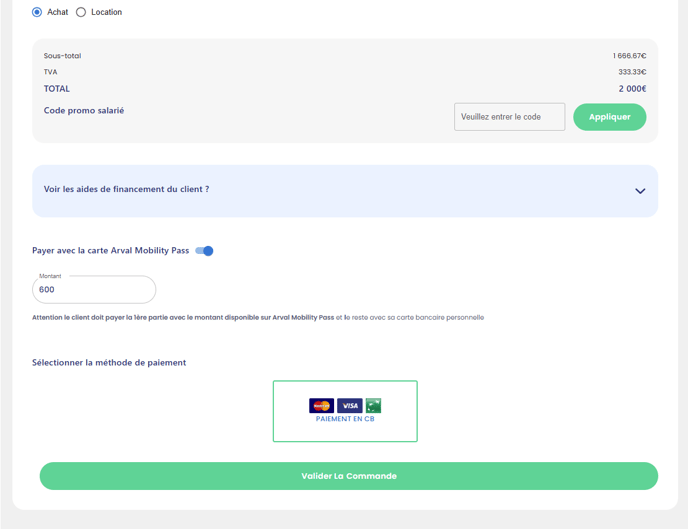
Example: the bike costs €2000 and the employee has €600 on their mobility card.
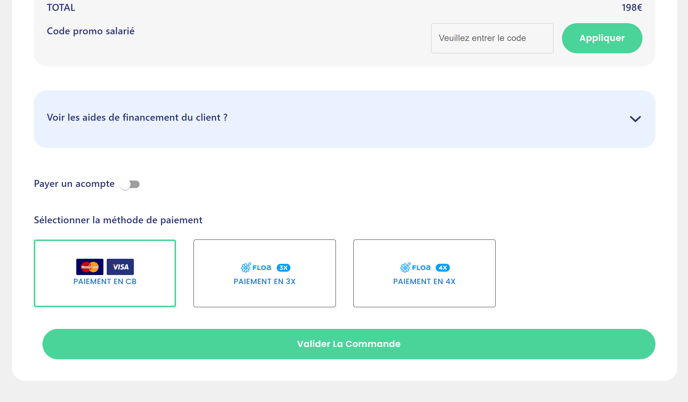
Select "Pay a deposit" or "Pay with Betterway/Arval Mobility Pass", and enter the amount available on the card.
-
The employee will receive a first payment link for €600, to be paid with their mobility card.
-
Then, a second payment link will be sent for the remaining €1400, to be paid with their personal bank card.
✅ Once both payments are completed, you will receive a confirmation email.
👉 The total sale amount is lower than the available credit on the card
Example: the employee has €600 available and buys a helmet for €200.
-
You do not need to use the deposit option.
-
Simply select "Pay by card" and the employee will receive a €200 payment link, which they can pay in full using their mobility card.
✅ Once the payment is completed, you will receive a confirmation email.