![image_white (1).png]](https://faq.beetogreen.com/hs-fs/hubfs/image_white%20(1).png?height=40&name=image_white%20(1).png)
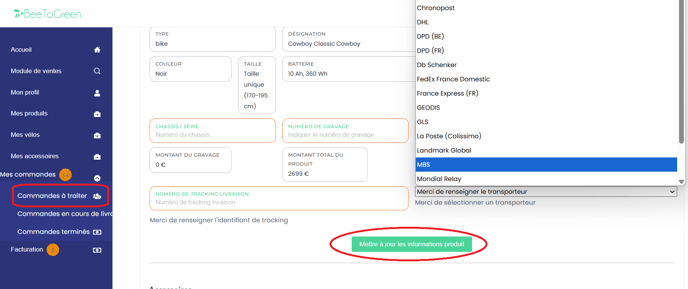
Go to your supplier space, in the "Mes commandes" (My Orders) section, then "Commandes à traiter" (Orders to process).
Follow these steps:
-
Add the numéro de suivi (tracking number)
-
Select the transporteur (carrier)
-
Click "Mettre à jour les informations produit" (Update product information)
⚠️ Important: You must enter the tracking number as soon as the shipment is made, because an automatic email is sent to the customer notifying them that their package has been shipped.